

You are here:
Play Kitty Glitter for Free
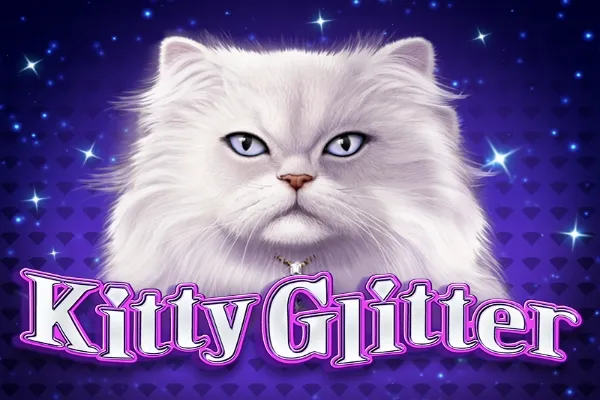
Kitty Glitter is an animal-themed video slot from IGT with a 5-reel, 30-payline layout. This medium-volatility game offers an RTP of 94.92% and features free spins and wild symbols.
Report broken game
Reset credits
Solar Disc
RTP94.04%
VolatilityMedium

The Wild Life
RTP96.16%
Volatility—
Wolf Run
RTP94.98%
VolatilityLow Medium
Amazon Queen
RTP95.94%
Volatility—
Wizard of OZ Ruby Slippers
RTP95.96%
VolatilityMedium High
Raging Rhino
RTP95.91%
VolatilityHigh
Thundering Buffalo
RTP94.91%
VolatilityHigh

She's a Rich Girl
RTP92.52%
VolatilityMedium
Coyote Moon
RTP94.98%
VolatilityLow Medium
OMG Kittens
RTP95.95%
VolatilityMedium High

Hoot Loot
RTP94.98%
VolatilityMedium

Solstice Celebration
RTP96.03%
VolatilityMedium

Gorilla Chief 2
RTP96.01%
Volatility—

Golden Wolves
RTP96.09%
VolatilityMedium
Wolf Rising
RTP96.05%
VolatilityLow Medium
Adorned Peacock
RTP96.09%
VolatilityMedium
Rakin' Bacon
RTP95.89%
VolatilityHigh

Wild Wolf
RTP93.92%
VolatilityMedium
Super Red Phoenix
RTP95.85%
Volatility—
100 Cats
RTP96.03%
VolatilityLow Medium
Double Wolf
RTP96%
VolatilityLow Medium

Buffalo Spirit
RTP95.97%
Volatility—
Panda Wilds
RTP0%
VolatilityLow Medium

Big Buffalo Megaways
RTP96.5%
VolatilityHigh
Kitty Glitter Slot Comparison
 Kitty Glitter Kitty Glitter |  50 Lions 50 Lions |  Cats Cats |  China Shores China Shores | |
|---|---|---|---|---|
User Score | (43665) | (147736) | (96879) | (88726) |
Return to Player | 94.92% | 94.71% | 93.04% | 96.1% |
Volatility | Medium | Medium High | Medium | High |
Min Bet | 0.3 | 0.5 | 0.01 | 30 |
Max Bet | 300 | 125 | 900 | 1500 |
Autoplay | Yes | No | Yes | Yes |
Bonus Rounds | Yes | Yes | Yes | Yes |
Number of Paylines | 30 | 50 | 30 | 30 |
| Coming Soon | Play Cats for Free | Play China Shores for Free |
About IGT Game Provider
IGT (International Game Technology) is a global leader in the gaming industry, specializing in the design, development, and distribution of gaming machines, lottery systems, and digital gaming solutions. With a diverse portfolio of innovative products, IGT offers casino games, slot machines, sports betting, and iGaming platforms. The company is known for integrating cutting-edge technology with a commitment to player experience, providing solutions for both land-based and online gaming operators.
Other Games from IGT
Discover more Games from IGT

Tiger and Dragon Super Gong
by IGT
(2)



Samurai 888 Spin Sakura
by IGT
(0)
Cute Cat Theme
You don't have to be told that this slot is based on the beautiful-looking cats. On the reels you will encounter a couple of symbols that stay true to the theme and they include Persians, Siamese, Tabbies, and Calicos Cats. Other symbols that are now common with many online slot games as well as all video poker games are the poker card symbols that run from Ace through to 10. Kitty Glitter Logo is the wild symbol and it substitutes all other regular symbols on the reels apart from the Bowl of Diamonds, which is the scatter. Scatters are your key to the free spins, so you need to watch out for them. Staying true to the theme, even the low paying poker card values have received a bit of glitter themselves. The game's sounds and music stay true to the theme. The graphics are also perfect and you will definitely enjoy playing this game for hours without feeling tired.
Some features to Make Life Easier
One of the slots features that stands out in this slot game is the Auto Spins button that allows you to make between 10 and 50 automatic spins. This function therefore gives you time to step away from the computer without necessarily having to stop play. The automatic spins run at the same speeds as the normal spins. The automatic spins will keep running until you run out of credits, you click the Stop button, or trigger a bonus round.
For optimal performance you can adjust the graphics quality by clicking the Options button, which is just next to the Auto Spin button. You will be provided with Best Mode, High Mode. Medium Mode, and Low Mode. The Best Mode will provide you with the best graphics, but your game's performance might suffer depending on your computer's capabilities. Use High Mode for good graphics and performance. The Medium and Low Modes are best for slower computers, but you will enjoy smooth animation performance.
Free Spins and Bonus Games
You will trigger the free spins by getting 3 or more Bowls of Diamonds scatter symbols on the second, third and fourth reels only. You will be rewarded with 15 free spins and you will be able to re-trigger more by getting 3 or more scatter symbols on the middle reels. The extra free spins will automatically be added to your remaining free spins. You will be able to re-trigger the free spins to a maximum of 225 free spins. The free spins mode is carried out at the same bets per line and active paylines as the spin that triggered the bonus feature.
The Bowl of Diamonds is also wild during free spins mode, and every time you get it on the 5th reel, it is automatically saved in a special on-screen accumulator. Collect 3 Bowls of Diamonds and all Persians are automatically turned to wilds on reels 2 though 5. Every additional set of 3 Bowls of Diamonds will avail you with an additional wild cat.
Payouts
This is the most flexible slot game that you will ever play as it features adjustable 30-lines. The actions takes place across the traditional 5-reels and you will also be able to alter your coin values that range from 1 to 100. You will be able to play as high as 3,000 coins per spin when playing all lines at the maximum bet per line. The White Persian Cat is the highest paying symbol in the game as 5 in a line payout 1,000 coins. The lowest paying symbols are the usual suspects: K, J, Q, and 10, paying 100 coins for 5 of a kind in a line.
Kitty Glitter: A Purr-fect Slot for Cat Lovers
Kitty Glitter is one of the best slots game you can ever play online. In spite of its simplicity, this game still appeals to high-rollers with its wide coin range. The bets per line, paylines, balance, and total stakes are all clearly indicated at the bottom of the reels. The winning combinations and bonus rounds hit more frequently than most games. If you love cats or animal-themed slots in general then Kitty Glitter is the purr-fect slot for you.
Kitty Glitter Slot FAQs
Is Kitty Glitter slot machine available to play for free?
It sure is! Kitty Glitter online slot is available to play for free on desktop or mobile right now. Enjoy spinning this fun feline title straight from your browser with no registration or download required.
Does Kitty Glitter online slot have free spins?
Yes! Free spins are triggered by landing 3 or more scatter symbols on the reels. You will start with 15 free spins and can re-trigger free spins up to a maximum of 225 in one game round.
Is Kitty Glitter slot machine safe to play online?
Absolutely! Our safe online casinos page features a great selection of trusted casinos where you can play with complete peace-of-mind. Join the cool cats, sign up today and bag yourself a purr-fect welcome bonus, too.
How do I deposit real money to play Kitty Glitter online slot?
There are a variety of ways you can deposit real money safely and securely to play Kitty Glitter slot machine. All reputable online casinos accept credit and debit cards, among other secure payment methods.